How to convert WMA to MP3?
We are glad to introduce you our software which can help you to perform this task.
There are several applications which are designed for this aim. You can find a software for converting of protected WMA or M4P, conversion to AAC or iTunes, extracting audio track from video and saving to MP3 format.
With help of Protected Music Converter you can remove DRM-protection from WMA and iTunes M4P files and convert them to MP3 or another unprotected format.
Latest updates: Fast Audio Converter version 2.6 updated on 22 Sep 2023
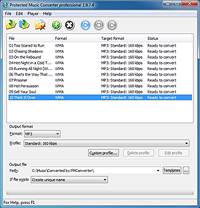
This software is designed to convert DRM-protected audio files. Using Protected Music Converter you can convert WMA and MP3 and it doesn't matter whether it is protected or not. Also it supports conversion of protected M4P files. List of supported formats contains M4B, M4A, OGG, WAV and more. Interface is straight and very easy to use. Thus it is simple to convert to MP3 format with help ot it.
This software supports batch conversion. And mass conversion of music files in WMA and MP3 format can be processed without problems.
Tag information will be transferred from source file to converted automatically.
The ideal solution for conversion of DRM - protected WMA and M4P files to MP3 format. And it can help you to convert to MP3 other audio and video formats.
 Features
 Download (Windows)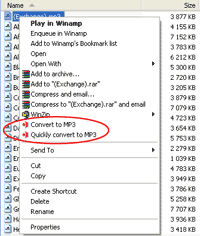
Another program which you may find useful for conversion to MP3 format is All to MP3 Converter. With the help of this program you can convert the most of video and audio files to MP3 format. It was created specifically to facilitate the process of conversion. This aim was achieved due to the fact that the interface of the program was integrated with the operating system interface. You just need to find source file you want to convert to MP3 using Explorer. Then right click on it and choose Convert to MP3 in appeared menu.
All to MP3 Converter supports batch conversion of large variety of audio and video formats
It is very useful if you have a media file and want to convert to MP3 easily.
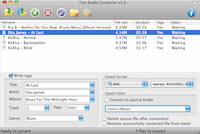
This software is especially useful for those people who prefer to control process of WMA to MP3 conversion from the main program's window only. You don't need to browse through a great amount of settings to get this program working as you need. Every significal option for conversion can be easily changed directly from the main window (like tags, output format and its settings, output folder, etc). Fast Audio Converter supports conversion of WMA and MP3, AAC, WMA, OGG Vorbis, FLAC, Apple loseless,WAV PCM and many audio and video formats. And of course, batch conversion of files is supported.
As far as it supports import to iTunes it can useful for conversion from WMA to iPod, iPhone or iPad.
Useful software to convert audio and video files and much more without fuss.
 Download (Mac)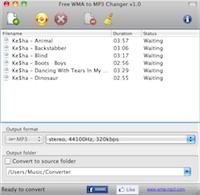
This freeware is designed to convert file in Window Media format to MP3 format. With the help of this program you may convert your audio files in WMA format to MP3. Also if you have video in WMV or ASF format then you may use our Free WMA to MP3 Changer to extract audio track from video and save it in MP3 format.
Interface of this program is very easy. It contains all necessary settings for conversion to MP3 format. There is nothing superfluous. ID3 tags will be transferred to converted file automatically.
Supports batch conversion. You can add files to convert with drag and drop. So you can convert all of your WMA files easily.
Supports import to iTunes. So you can specify playlist to import converted MP3 file.
Free and easy program to convert from WMA to MP3 which does the job.
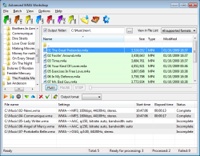
The interface of this program is a classical Windows interface. Thus, with it you can easily locate the necessary WMA file. And when it is located you can immediately convert it to MP3. Or add it to the batch queue, to start the process of conversion of several files.
Advanced WMA Workshop offers you a wide selection of extended options to convert to MP3 and WMA formats. And of course, is supports transfer of ID3 tags from the original WMA file. If you need then you can correct them.
Supported formats: WMA, MP3, AAC, OGG, WAV, APE, FLAC. In addition, you can convert your Audio CDA tracks.
Multi-format conversion software for encoding/decoding of WMA format with classical interface.
Copyright © 2002-2024 LitexMedia